

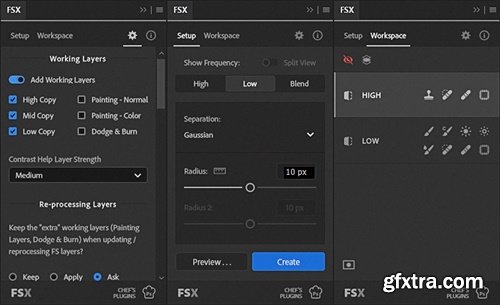
- FSX Plugin is a complete workflow system for expert-level frequency separation in Photoshop. It’s a smart, efficient retouching workflow designed to save time and give you full control. Work faster, stay organized, and focus on the details that matter—perfect for everything from quick cleanups to high-end work.
- The Expert’s Tool for Frequency Separation
Best Features: This is a pre-release version and has not been fully tested. Use at your own risk. For Photoshop CC2025 and later Create frequency separation layers instantly or with live preview Toggle view of high and low frequency layer or composite view at any point. Split-view of High & Low layers is available during live previe. High Frequency is previewed with increased contrast to enhance visibility. Create frequency separation layers using Gaussian Blur, Median, 2× Median (smoother), or Surface Blur Supports multi-frequency separation – adding a Middle Frequency layer, using either Gaussian Blur or Median Allows reprocessing of frequency separation layers—you can change the split radius and filter at any time during your workflow Fully customizable layer setup: optional working layers and painting layers, customizable layer names, and further customization via custom action Measurement Tool displays the radius as a relative value based on a measurement on the image Automatically switches to the Workspace tab when new layers are created; auto-selects your preferred layer and tool (optional) Workspace enables easy switching between frequencies, automatically selecting the correct layer and activating the last used tool Quick toggle between frequency view and blended composite—clicking the active frequency switches the view Buttons to toggle before/after view of adjustments on each frequency Smart Mask & Restore button makes it easy to mask out mistakes and restore the working layer Quickly accessible working tools: selecting a tool automatically sets it to its last used settings, with options to save or reset default settings Painting tools can automatically use their dedicated painting layers, or base working layer Patch Tool on Low Frequency supports feathering and fading 


126,000 Royalty-Free 3D Model

Udemy Türkçe


Top Rated News
- CreativeLive Tutorial Collections
- Fasttracktutorials Course
- Chaos Cosmos Library
- MRMockup - Mockup Bundle
- Finding North Photography
- Sean Archer
- John Gress Photography
- Motion Science
- AwTeaches
- Learn Squared
- PhotoWhoa
- Houdini-Course
- Photigy
- August Dering Photography
- StudioGuti
- Creatoom
- Creature Art Teacher
- Creator Foundry
- Patreon Collections
- Udemy - Turkce
- BigFilms
- Jerry Ghionis
- ACIDBITE
- BigMediumSmall
- Globe Plants
- Unleashed Education
- The School of Photography
- Visual Education
- LeartesStudios - Cosmos
- Fxphd
- All Veer Fancy Collection!
- All OJO Images
- All ZZVe Vectors
- CGTrader 1 CGTrader 2



















